Calendar calendar = Calendar.getInstance();
calendar.setTime(givenDate);
calendar.add(Calendar.YEAR, -1);
Showing posts with label java. Show all posts
Showing posts with label java. Show all posts
Tuesday, February 14, 2012
Java: subtract a year on a given Date

Monday, February 13, 2012
Turn off code formatter for certain lines in Eclipse 3.6+
Often, we do not want eclipse to auto-format some lines. In Eclipse 3.6+ you can turn off code formatting:

- Preferences -> Java -> Code Style -> Formatter
- Create your own profile if you have not done it yet: New...
- Edit your profile, in the Off/On Tags, Enable Off/On Tags
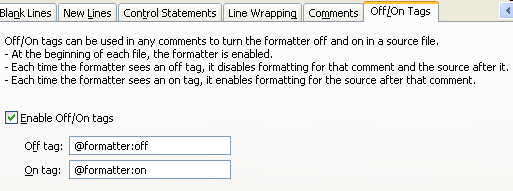
See also New features in Eclipse 3.6
Sunday, February 12, 2012
Parse microseconds in Java
SimpleDateFormat in java does not support microseconds. It supports down to milliseconds only.
In some cases, we want to parse Time from string, which includes microseconds, or format a Date/Time to a string (with microseconds).
Here are some sample java code to work around this problem.
See also http://stackoverflow.com/questions/2132247/custom-date-format-cannot-be-parsed-java
In some cases, we want to parse Time from string, which includes microseconds, or format a Date/Time to a string (with microseconds).
Here are some sample java code to work around this problem.
public class DateTimeUtil {

 public static final String FORMAT_PATTERN = "yyyyMMddHHmmss.SSS000";

 public static Date parse(String ds) throws Throwable {

  String[] tokens = ds.split("\\.");
  if (tokens.length != 2) {
   throw new Exception("Invalid date string: " + ds);
  }
  int fractionalSecs = Integer.parseInt(tokens[1]) / 1000;
  return new SimpleDateFormat("yyyyMMddHHmmss.SSS").parse(String.format("%s.%03d", tokens[0], fractionalSecs));
 }

 public static String format(Date date) {

  return new SimpleDateFormat(FORMAT_PATTERN).format(date);
 }

}
See also http://stackoverflow.com/questions/2132247/custom-date-format-cannot-be-parsed-java
Monday, November 21, 2011

Wednesday, November 16, 2011
Convert byte size into human readable format in Java ( and GWT )
Java:
Orgin from here
public static String humanReadableByteCount(long bytes, boolean si) {
    int unit = si ? 1000 : 1024;
    if (bytes < unit) return bytes + " B";
    int exp = (int) (Math.log(bytes) / Math.log(unit));
    String pre = (si ? "kMGTPE" : "KMGTPE").charAt(exp-1) + (si ? "" : "i");
    return String.format("%.1f %sB", bytes / Math.pow(unit, exp), pre);
}
Java GWT:public static String humanReadableByteCount(long bytes, boolean si) {
int unit = si ? 1000 : 1024;
if (bytes < unit)
return bytes + " B";
int exp = (int) (Math.log(bytes) / Math.log(unit));
String pre = (si ? "kMGTPE" : "KMGTPE").charAt(exp - 1)
+ (si ? "" : "i");
return toFixed(bytes / Math.pow(unit, exp), 1) + " " + pre
+ "B";
}
public static native String toFixed(double d, int fixed)/*-{
return d.toFixed(fixed);
}-*/;
Orgin from here
Sunday, November 13, 2011
GWT: JSNI function to validate URL
public native boolean isValidUrl(String url) /*-{
    var pattern = /(http|https):\/\/(\w+:{0,1}\w*@)?(\S+)(:[0-9]+)?(\/|\/([\w#!:.?+=&%@!\-\/]))?/;
    return pattern.test(url);
}-*/;
Java: use signed types to store unsigned values
short, int, long are always signed in Java. However, it only matters if you are doing math with it. Otherwise, you can store unsigned values using the signed types by utilizing the sign bit.
If you do need to do some math:
1) for unsigned short, us,
convert it to int by masking: int i = us & 0xffff;
Do all arithmetic with int operands, modulo 0xffff.
When you are done, cast the result back to int and transmit it.
2) for unsigned int, ui,
convert it to long by masking: long l = ui & 0xffffffffL;
Do all arithmetic with long operands, modulo 0xffffffffL.
When you are done, cast the result back to int and transmit it.
Subscribe to:
Posts (Atom)